.png)
For Parents
Links and resources for our parents/guardian
Links for Parents
MOE Group Personal Accident (GPA) Insurance Plan for Students and Product Factsheet
Please refer to document (Click here to download (opens in new tab)) for the product factsheet for the MOE GPA Insurance Plan for Students.
Please refer to the document (click here to download) for the product factsheet for MOE Group Personal Accident (GPA) Insurance Plan for Students.
Parents are to submit the claims online through Income Insurance’s GPA portal https://studentgpa.incomegroupins.com.sg (opens in new tab).
Information on claims, FAQs and other details pertaining to the MOE GPA Insurance Plan for students can be found on Income’s website at https://www.income.com.sg/studentgpa (opens in new tab)
SLS Activation Guide 2026
SLS Account Activation Guide for P1 (opens in new tab)
Parents' Handbook 2026
Click here to download the Parents Handbook 2025 [PDF, 1.31 MB] (opens in new tab)
MOE Website Link
https://www.moe.gov.sg/ (opens in new tab)
MOE Parent Kit
http://www.moe.gov.sg/parentkit (opens in new tab)
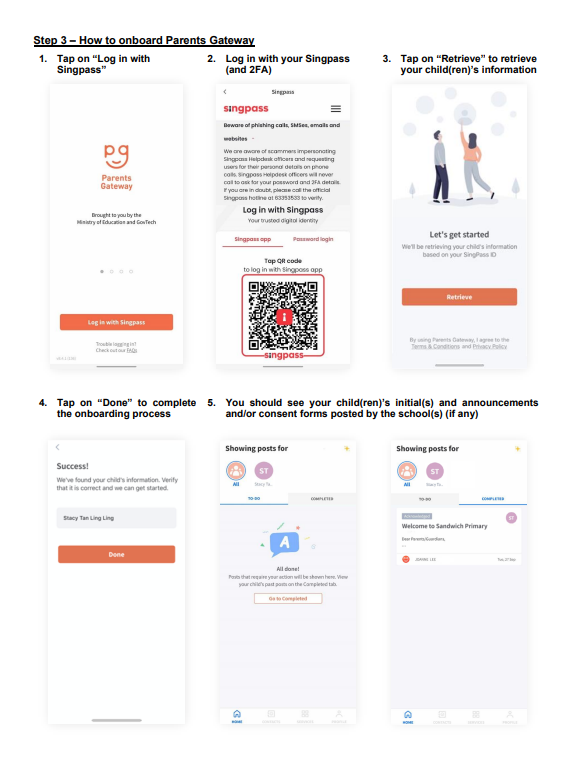
Parents Gateway Onboarding User Guide

Parents Gateway Installation Guide
Parent Gateway is one of the mobile app that the school uses to inform or disseminate class or school-based information as well as updating information, consent form and managing school appointment (coming soon) . The Parent Gateway app is free and available for download to all mobile devices (subject to minimum requirements in the OS version of the mobile device), and accessible using SingPass account.
Step 1: SingPass Registration and 2FA Setup
SingPass is required for onboarding to Parents Gateway (PG). If you have not registered for a SingPass or have not set up the 2FA, please visit the Singpass website
SingPass requirement for Parents Gateway
SingPass requirements
Type of user for SingPass | Link | Remarks |
|---|---|---|
Reset SingPass | ||
Register for SingPass | see eligibility for foreign citizens/ non-Singaporeans | |
Eligibility | accurate as of March 2024 |
Requirement to register SingPass:
The minimum age requirement is 15 years old.
The following groups of users are eligible to apply for Singpass:
Singapore Citizen and Permanent Resident
Employment Pass and Personalised Employment Pass holders
EntrePass holders
S Pass holders
Dependant's Pass holders (of EP, PEP, EntrePass and S Pass holders)
Long Term Visit Pass-Plus (LTVP+) holders
Long Term Visit Pass holders
Work Permit holders
Student Pass holders
Immigration Exemption Order holders
For any inquiries with regards to eligibility and accessing the Parents Gateway, please contact the General office provided in Contact Us in this page
Step 2: Download Parents Gateway Mobile App
a. Open the Apple App Store or Google Play Store app on your mobile phone.
b. Search for the ‘Parents Gateway’ mobile app or scan the QR code below.
Types of Access for PG app
Type of Access | Android Devices | Apple Devices | Desktop PC/Mac |
|---|---|---|---|
Access Possible | Yes | Yes | No |
Type of devices | Mobile phones, tablets (excluding chromebook) | iPhones and iPads | Desktop, laptop, macbook etc... |
Minimum requirement | Android 8.0 or later | iOS 12.0 or later | No access |
How to download the app | No access |
Step 3: Setup Parents Gateway app